> For the complete documentation index, see [llms.txt](https://subscriptionsuite.gitbook.io/helpdoc/llms.txt). Markdown versions of documentation pages are available by appending `.md` to page URLs; this page is available as [Markdown](https://subscriptionsuite.gitbook.io/helpdoc/getting-started/analytics.md).
# Analytics
The **Analytics** dashboard gives you a complete overview of your subscription business.
Track recurring revenue, subscription growth, customer retention, billing performance, and inventory insights, all from one place.
Whether you're monitoring daily performance or long term growth, Analytics helps you make better business decisions with real time subscription data.
***
## Dashboard Overview
At the top of the page, you can choose how you want to view your data.
**Date Range**
Select the period you want to analyze.
Available options include:
• Today\
• Yesterday\
• Last 7 days\
• Last 30 days\
• Last 90 days\
• Last 365 days\
• Custom date range
For a custom range, select the **Since** and **Until** dates and click **Apply**.
***
#### Sales Channel
Filter your analytics by sales channel.
This allows you to compare subscription performance across different channels.
***
#### Compare Period
Compare your current performance with a previous period to measure growth and identify trends.
***
#### Export CSV
Export your analytics data as a CSV file for reporting or further analysis.
***
## Analytics Tabs
SubscriptionSuite organizes your analytics into different sections to help you focus on the metrics that matter most.
***
### Overview
The Overview tab displays the most important subscription metrics at a glance.
Use this section to quickly understand how your subscription business is performing.
#### What You Can See
The Overview includes:
• Monthly Recurring Revenue\
• Active Subscribers\
• New Subscribers\
• Revenue\
• Average Order Value\
• Cancellations\
• Failed Charges
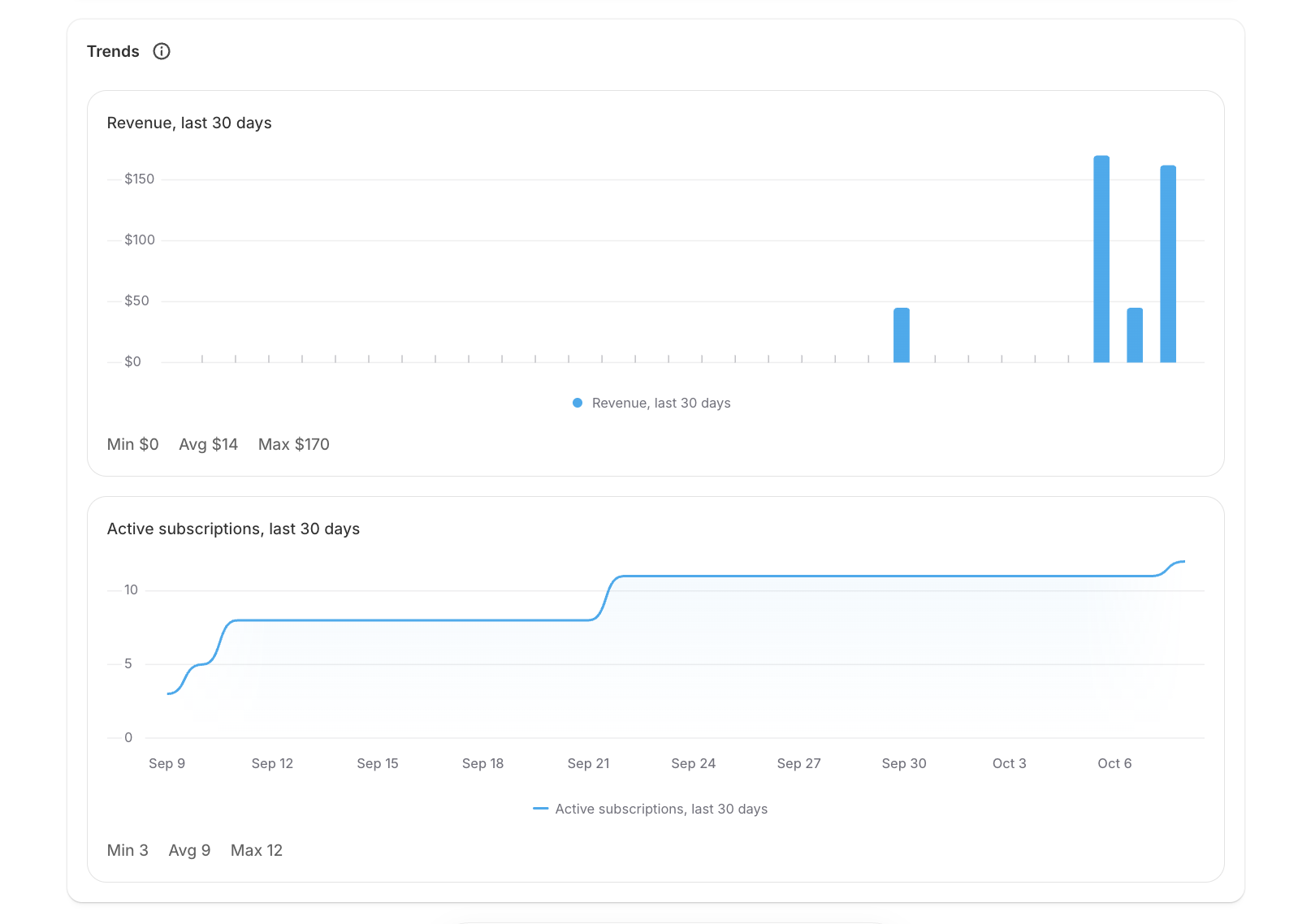
Below the key metrics, the **Trends** section shows how your revenue and active subscriptions change during the selected period.
***
### Retention
The Retention tab helps you understand customer loyalty, subscription health and Cancellation reasons.
Monitor how many customers continue their subscriptions over time and identify opportunities to improve retention.
### Retention & Churn
At the top of the Retention tab, you can quickly monitor:
• **Churn Rate**\
• **Cancellation Rate**\
• **Approval Rate**\
• **Average 3 Month Retention**
These metrics give you a quick view of subscriber health and how well customers are being retained over time.
***
### Subscriber Growth
Subscriber Growth shows how your subscriber base changed during the selected period.
It includes:
• New subscribers\
• Resumed subscriptions\
• Cancelled subscriptions\
• Paused subscriptions\
• Net change
This makes it easy to see whether your active subscriber base is growing or shrinking.
***
### Cohort Retention
Cohort Retention shows how well groups of new subscribers stay subscribed over time.
Each row represents customers who subscribed during the same month, while the following columns show the percentage still active after later months.
This helps you understand whether newer subscriber groups are being retained better or worse over time.
***
### Cancellation Reasons
The Cancellation Reasons section shows why customers are cancelling their subscriptions.
Use this information to identify common reasons for churn and improve your subscription or cancellation experience.
***
### Store Credit Issued
This section shows the amount of **store credit issued during the selected period**.
It also shows the number of store credit grants and the currency used.
***
### Per Product Breakdown
The Per Product Breakdown helps you compare subscription performance across your products.
You can review:
• Active subscriptions for the product\
• Estimated monthly revenue\
• Cancelled quantity\
• Cancellation rate\
• Approval rate\
• Churn rate
Products are shown based on monthly subscription revenue.
***
### Inventory
The Inventory tab helps you stay prepared for upcoming subscription renewals.
Monitor inventory related insights and avoid stock issues before scheduled deliveries.
### Top Selling Plans
See which selling plans currently have the most subscribers and how subscribers are distributed across your plans.
You can also click **View all subscriptions** to open your full subscription list.
***
### Inventory Forecast
Inventory Forecast estimates how many units of each variant you may need for upcoming subscription orders.
The forecast is based on upcoming billing dates from active subscriptions.
If there are no upcoming orders during the selected period, the forecast will remain empty.
***
### Product Delivery Forecast
Product Delivery Forecast shows the projected quantity of each product needed for upcoming subscription deliveries.
This can help you prepare stock before scheduled subscription orders are processed.
***
## Key Metrics
The dashboard includes several important subscription metrics.
### Monthly Recurring Revenue (MRR)
MRR represents the estimated recurring revenue generated by your active subscriptions each month.
Tracking MRR helps you measure the overall growth of your subscription business.
***
### Active Subscribers
Displays the number of subscribers currently active during the selected period.
This gives you a quick view of the size of your active subscriber base.
***
### New Subscribers
Shows how many new subscribers were added during the selected period.
Use this to understand subscriber acquisition and growth.
***
### Revenue
Displays the total subscription revenue generated during the selected date range.
***
### Average Order Value (AOV)
Average Order Value shows the average amount customers spend per subscription order.
Increasing AOV is a great way to grow revenue without increasing customer acquisition costs.
***
### Cancellations
Shows the number of subscriptions cancelled during the selected period.
Monitoring cancellations can help you identify trends and improve customer retention.
***
### Failed Charges
Displays the number of subscription payments that failed during the selected period.
Use this metric together with the **Billing Failures** dashboard to monitor your payment recovery performance.
***
## Revenue Trends
The Revenue chart helps you visualize subscription revenue over time.
Use this graph to:
* Monitor business growth.
* Compare revenue across different periods.
* Identify seasonal trends.
* Measure the impact of promotions and marketing campaigns.
***
## Active Subscription Trends
Track how your subscriber count changes over time.
This chart helps you understand:
* Subscriber growth
* Customer retention
* Subscription activity
* Overall business health
Steady growth in active subscriptions is a strong indicator of a healthy subscription business.
***
## Using Analytics to Grow Your Business
Analytics isn't just about numbers, it's about making better decisions.
Use the dashboard to:
* Track recurring revenue growth.
* Measure customer retention.
* Monitor subscription performance.
* Identify opportunities to increase Average Order Value.
* Understand how marketing campaigns affect subscriptions.
* Monitor payment recovery and cancellations.
Reviewing your analytics regularly can help you optimize your subscription strategy and improve long term customer retention.
***
## Best Practices
To get the most out of your Analytics dashboard:
* Review your dashboard regularly.
* Compare performance with previous periods.
* Monitor MRR as your primary growth metric.
* Keep an eye on cancellations and failed charges.
* Use the Retention tab to understand customer behavior.
* Monitor Inventory insights to stay ahead of upcoming subscription renewals.
* Export reports when sharing performance with your team.
***
## Frequently Asked Questions
#### How often is Analytics updated?
Analytics is updated automatically as new subscription activity takes place.
#### Can I export my reports?
Yes. Click **Export CSV** to download your analytics for further analysis or reporting.
#### Can I compare different time periods?
Yes. Use the **Compare Period** filter to compare your current performance with previous periods.
#### Why are my graphs empty?
If you haven't created any subscriptions yet, or there hasn't been any subscription activity during the selected date range, the dashboard will not display any data.
***
### Need Help?
If you have any questions about your Analytics dashboard or need help understanding your subscription performance, our support team is always happy to help through the in app chat.